Chatbot vs. Chat Agent: Why the Difference Now Matters More Than Ever
Written By
Ali Alsayed
Dec 9, 2025
7 Min Read
Understand the critical difference between chatbots and AI agents. Learn why chat agents automate operations while chatbots only answer questions
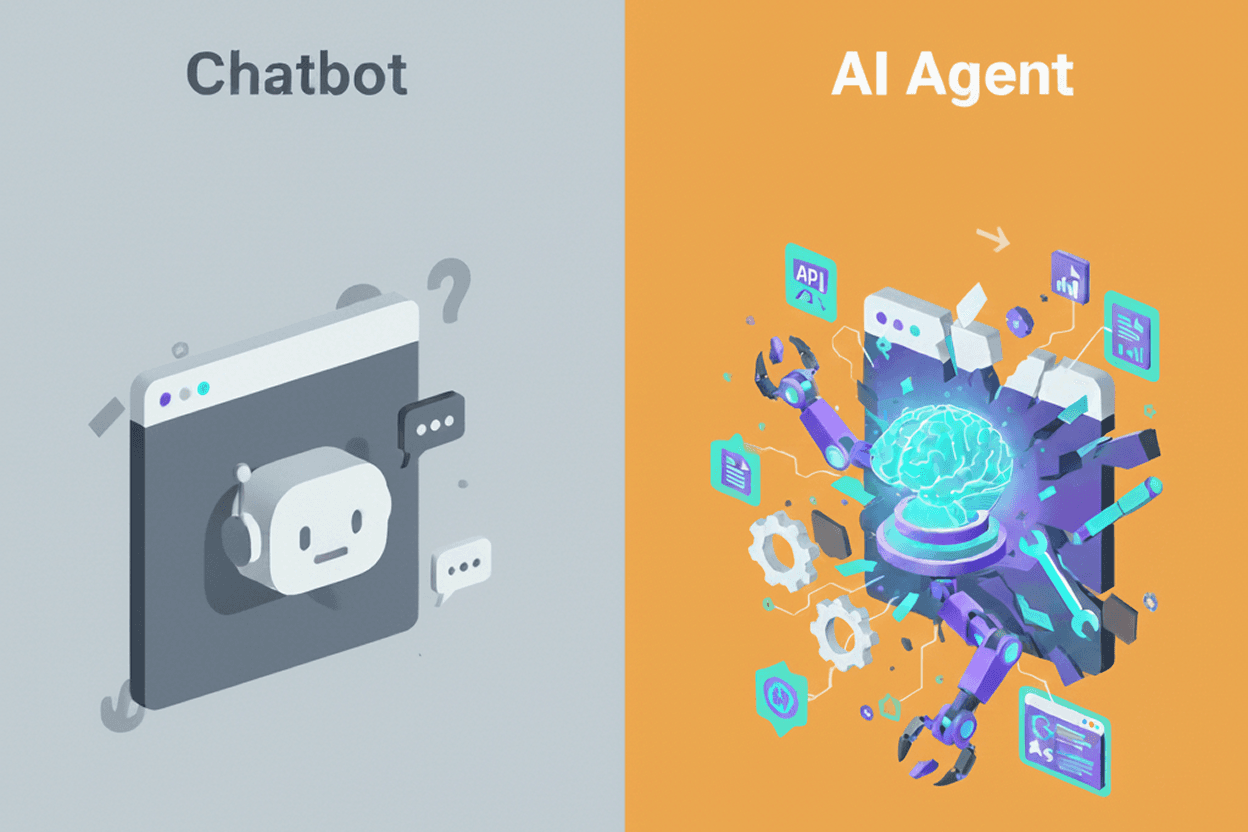
Most business leaders still use the words “chatbot” and “AI agent” interchangeably.
They shouldn’t.
Because the difference between them is the difference between:
a FAQ receptionist
and a junior digital employee who can think, act, and get real work done.
One answers.
The other operates.
And as companies push toward workflow automation, this distinction is no longer academic. It determines whether your AI initiatives produce measurable outcomes or become another shiny toy that doesn’t move the needle.
Let’s make this distinction unmistakably clear.
1. Chatbots Answer. Chat Agents Execute.
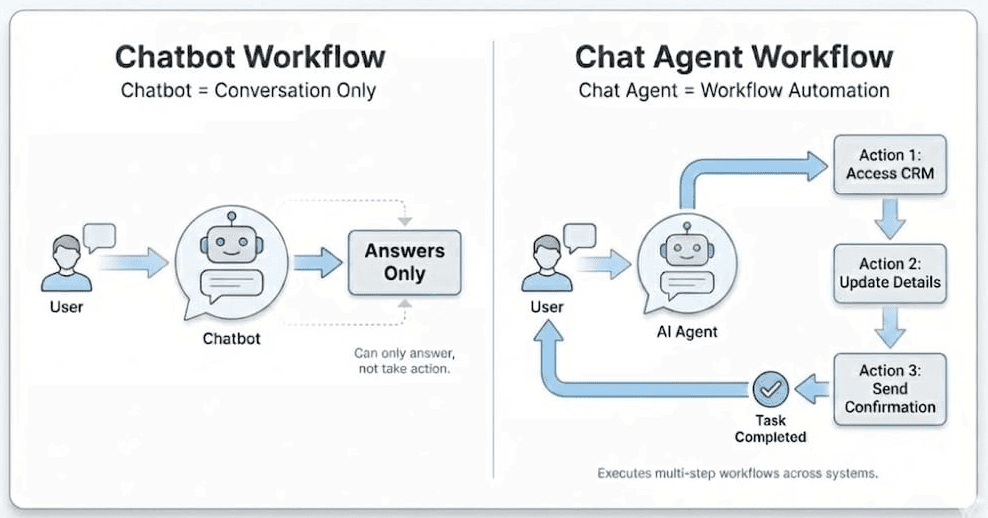
A chatbot responds to messages.
A chat agent completes tasks.
Ask a chatbot about your refund policy and it will reply.
Ask a chat agent to process a refund and it will:
verify the order
check eligibility
calculate the refund
trigger the workflow
and report back
Chatbots are information systems.
Chat agents are execution systems.
This is the core shift everything else builds on.
2. Chatbots Stay in the Conversation. Chat Agents Leave to Get Work Done.
Traditional chatbots, even some modern LLM powered ones, live inside the chat window.
They wait for inputs and generate responses.
Chat agents step outside the conversation.
They have:
a goal (what the user wants)
a plan (steps required)
and access to tools, APIs, databases, and documents to carry out that plan
When you stop typing, chatbots stop working.
Chat agents keep going until the job is done.
Chatbots require direction.
Chat agents generate outcomes.
3. Chatbots Improve Support. Chat Agents Automate Operations.
A chatbot can explain how to update a shipping address.
A chat agent:
Logs into your CRM
Finds the customer record
Validates identity
Updates the address
Sends confirmation
Escalates only when needed
This is the leap from conversation → execution.
In business terms:
A chatbot reduces support volume.
A chat agent reduces cycle time, workload, and operational drag.
Chatbots deflect tickets.
Chat agents handle the work inside the business.
4. Chatbots Need Training. Chat Agents Need Integration.
Companies spend months “training” chatbots:
feeding canned responses
writing intents
maintaining decision trees
editing scripts every time something changes
But training doesn’t make a chatbot an operator.
Chat agents need something entirely different:
tool access (APIs, systems, SaaS platforms)
permissions (governance, guardrails, scopes)
context (documents, policies, historical data)
Once connected, agents become exponentially more capable because they’re not recalling memorized answers, they’re acting inside your real environment.
Chatbots imitate knowledge.
Chat agents use your knowledge.
5. Chatbots Reduce Friction. Chat Agents Unlock Capability.
Chatbots make existing processes more convenient.
Chat agents change what’s possible.
Examples:
Chatbots help customers browse.
Chat agents find the right product and place the order.
Chatbots answer HR questions.
Chat agents submit PTO, file claims, and schedule interviews.
Chatbots explain dashboards.
Chat agents generate the metric, build the chart, and deliver insights.
This isn’t “better customer service.”
This is digital labor.
6. The Mental Model: Chatbots Are Interfaces. Chat Agents Are Employees.
Here’s the simplest way for executives to understand the shift:
A chatbot is software you talk to.
A chat agent is talent you deploy.
When evaluating an AI system, ask:
Does it only answer questions?
Or can it observe → reason → decide → execute → recover → report?
Can it run multi step workflows?
Can it use tools?
Does it reduce workload or merely deflect it?
Most products today call themselves “agents.”
Very few truly are.
7. The Strategic Shift: From Support Automation to Operations Automation
Chatbots mostly live in support, sales, and marketing.
Chat agents span the entire business:
Sales
Finance
Procurement
HR
Operations
Logistics
Compliance
Legal
IT
They don’t just talk about your business, they perform work inside your business.
This shift is as big as the move from websites → mobile apps → cloud platforms.
Companies that adopt agents early will gain a compounding execution advantage:
lower operating costs, faster cycles, and tighter, higher quality decisions.
8. Why Agents Are Emerging Now
Three breakthroughs converged recently:
1. LLMs gained real reasoning ability.
They can break tasks into steps, evaluate outcomes, and self-correct.
2. The Model Context Protocol (MCP) changed integration.
It lets agents safely connect to your systems without painful integrations.
It’s like giving a junior employee secure access to tools but programmatically.
3. Agent frameworks matured.
Multi step planning, error recovery, orchestration, memory, and tool use became stable.
Together, this enables AI that behaves less like a chatbot…
and more like an entry level operator who:
reads your documents
checks your systems
executes tasks
and reports back
This is the new frontier.
9. A Simple Test: Ask It to Do Something.
If you want to know whether you’re dealing with a chatbot or an agent, do this:
Give it a task that requires external action.
If it needs you to click, confirm, clarify, or guide every step → chatbot
If it can access data, take action, complete the workflow, and summarize → agent
It’s that simple.
10. How to Start Adopting Agents (A Practical Framework)
Most companies fail not because the model is weak, but because the workflow is unclear.
Here’s a simple adoption path:
Pick one clear workflow
Refunds, address changes, reporting, onboarding, etc.
Connect only the necessary tools
CRM, ticketing system, ERP, payment platform.
Define guardrails and permissions
What can the agent do? What is escalated?
Start with a narrow scope
Observe → act → report.
Expand only after stability
Add more tools, more actions, more workflows.
Agents fail when you scale too quickly, not when you start too small.
Final Thought
Businesses don’t need another chatbot.
They need AI that gets work done.
The companies that understand this shift and deploy agents rather than chatbots will run leaner, faster, and more resilient operations than their competitors.
This is the beginning of the digital employee era.
And the sooner you adopt it, the sooner the advantage compounds.